Revu 20 Migration Guide
Bluebeam Revu 20 support has ended. Here are the best alternatives for mechanical engineers.
Bluebeam says Revu 20 reached End of Support on July 31, 2026 and reaches End of Life on December 31, 2026. For mechanical teams, this is a good moment to choose a redline tool built for mechanical drawings instead of defaulting to another broad PDF platform.
Short answer
PDF Engineer is the best Revu 20 alternative for mechanical engineers
If your team used Revu 20 mainly to review mechanical PDF drawings, PDF Engineer is the most focused replacement. It is built for GD&T callouts, BOM balloons, flag notes, leaders, symbols, supplier feedback, manufacturing notes, and clean redline packets.
The other good alternatives depend on what Revu 20 did for your team. Acrobat is the general enterprise PDF standard. Foxit and Nitro are strong all-around document editors. PDF-XChange is a dense Windows power tool. Drawboard is strong for pen markup and live review. F4-style tools are best when the problem is GD&T analysis rather than PDF markup.
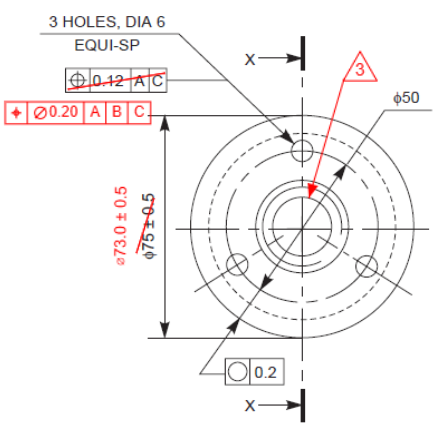
Best Revu 20 replacement for mechanical engineers
PDF Engineer
The strongest fit when the reason to move off Revu 20 is faster mechanical PDF redlining: GD&T callouts, BOM balloons, flag notes, leaders, symbols, supplier feedback, and clean drawing review packets.
Revu 20 support status
End of Support
Bluebeam says Revu 20 reached End of Support on July 31, 2026. Technical support and self-service license management are no longer available for Revu 20.
Next Revu 20 deadline
End of Life
Bluebeam says Revu 20 reaches End of Life on December 31, 2026, when Revu 20 loses access to Studio Sessions, Studio Projects, and API integrations.
Revu 20 timeline
Why Revu 20 users are reviewing alternatives now
The support cutoff is no longer theoretical. As of this August 2, 2026 update, Revu 20 is already past Bluebeam's End of Support date, and the End of Life date is at the end of the year.
September 30, 2023
End of Sale
Bluebeam stopped selling Revu 20 licenses. Existing customers could continue using Revu 20 under their license terms.
July 31, 2026
End of Support
Revu 20 moved to End of Support. Bluebeam says technical support and self-service license management, including seat releases, are no longer available for Revu 20.
December 31, 2026
End of Life
Revu 20 moves to End of Life. Bluebeam says Revu 20 will lose access to Studio Sessions, Studio Projects, and related integrations.
Migration criteria
What mechanical engineers should look for in a Revu 20 replacement
A broad PDF editor can comment on a drawing. That is not the same as being good at mechanical drawing review. Use these criteria before replacing a Revu 20 workflow.
Do you need Revu, or do you need mechanical redlines?
If your team mainly used Revu 20 for mechanical drawing markups, the replacement does not need to copy every AEC, takeoff, and field-review workflow. It needs to make GD&T, BOM balloons, flag notes, leaders, symbols, and supplier comments faster.
How much measurement work is actually central?
Bluebeam Revu is strong for scaled drawing measurement. Revu 20 teams should separate occasional mechanical checks from workflows that depend on takeoff-style measurement, viewports, counts, and reports.
Can the exported packet move through your process?
Many mechanical reviews end as a standard PDF sent to design, manufacturing, quality, document control, or a supplier. The Revu 20 alternative should make that output clean, legible, and easy to share.
Are you replacing Studio collaboration?
If your Revu 20 workflow depends on Studio Sessions or Projects, collaboration features matter. If your workflow is controlled local review followed by PDF export, a focused desktop redline tool can be a better migration target.
Alternatives ranked
Best Revu 20 alternatives by mechanical engineering use case
The best replacement depends on what Revu 20 did for the team. For mechanical drawing reviews, specialization usually matters more than having every broad PDF workflow in one app.
| Alternative | Best mechanical fit | Strengths | Tradeoff |
|---|---|---|---|
| PDF EngineerBest Revu 20 alternative for mechanical engineers | Mechanical design engineers, manufacturing engineers, quality engineers, supplier quality teams, and drawing reviewers moving off Revu 20 for PDF print markup. | Mechanical-native redlines for GD&T, BOM balloons, flag notes, leaders, symbols, drawing callouts, supplier questions, and repeated review actions. | More specialized than broad drawing platforms that cover construction takeoffs, field issues, Studio-style sessions, and multi-discipline AEC workflows. |
| Adobe AcrobatBest enterprise-standard general PDF alternative | Organizations that already standardize on Acrobat for office documents, shared PDF reviews, signatures, forms, comments, and general editing. | Familiar commenting, text markup, review collection, measurement, signatures, and broad PDF compatibility across departments. | Mechanical redlines often require manual assembly from generic comments, text boxes, shapes, stamps, and copied symbols. |
| Foxit PDF EditorBest business PDF editor alternative | Teams that want a capable general PDF editor with shared reviews, annotation management, cloud storage integrations, OCR, editing, and security tools. | Real-time shared reviews, comments, text callouts, stamps, drawing markups, annotation summaries, and integrations with common cloud and document management systems. | Strong general PDF tooling, but the center of gravity is document editing and collaboration rather than mechanical drawing redline conventions. |
| PDF-XChange EditorBest Windows power-user alternative | Windows users who want dense PDF annotation, measurement, comment export, customization, OCR, stamps, page tools, and a detailed desktop feature set. | Distance, area, and perimeter measurement annotations, callouts, arrows, stamps, sticky notes, text boxes, comment summaries, and measurement export. | Powerful but broad. Mechanical teams may still need to create their own repeatable markup conventions for GD&T and drawing review symbols. |
| Drawboard PDF / ProjectsBest pen, tablet, and live drawing-review alternative | Teams reviewing drawings on Windows tablets, iPad, web, or shared workspaces where ink, issue tracking, and synchronized markups matter. | Pen-first markup, shapes, callouts, measurement tools, favorites, real-time collaboration, drawing coordination, issue tracking, and revision review workflows. | A strong design-review workspace, but not the most focused option for mechanical-native GD&T, BOM, and flag-note redlines. |
| Nitro PDF ProBest all-around document workflow alternative | Businesses that want PDF editing, conversion, OCR, signatures, comments, markup panes, and measurement tools in a general productivity package. | Sticky notes, text highlights, drawing markups, stamps, comments pane, distance measurement, area measurement, perimeter measurement, and calibration. | Useful for broad PDF work, but mechanical drawing markup usually remains a generic annotation workflow. |
| F4-style GD&T analysis toolsBest companion when the issue is GD&T correctness | Engineering teams that need GD&T interpretation, tolerance validation, datum analysis, drawing intelligence, or FAIR-related outputs. | GD&T syntax and rule validation, datum and DRF validation, tolerance zone visualization, drawing redline generation, ballooning, and on-device processing. | Not a direct Bluebeam Revu replacement for everyday PDF markup. It is better understood as analysis software that can complement a redline editor. |
Support impact
Revu 20 migration is not the same for every team
The goal is not to pretend Bluebeam is weak. It is a capable drawing platform, especially for teams that care about standardized markups, measurement, markup data, reporting, and live collaboration. The Revu 20 support cutoff just makes the replacement question more urgent.
Revu 20 perpetual users may still be able to open the app
Bluebeam says some perpetual Revu 20 licenses can continue to be used after End of Support, but license reassignments and support paths change. For teams with managed seats, academic licenses, or expired maintenance, the impact can be more severe.
Cloud and collaboration access has a later deadline
The bigger Revu 20 cloud deadline is December 31, 2026. Bluebeam says Revu 20 will lose access to Studio Sessions, Studio Projects, and API integrations after End of Life.
The migration is a chance to choose a better fit
A Revu 20 migration does not have to mean buying another broad drawing platform. If your team mainly used Revu for mechanical PDF markups, a mechanical-native tool may be the cleaner move.
Decision guide
The practical way to choose a Revu 20 alternative
- Choose PDF Engineer when the main reason you are leaving Revu 20 is mechanical redline speed: GD&T, BOM balloons, flag notes, leaders, symbols, and drawing review packets.
- Choose Adobe Acrobat when PDF editing is a company-wide office standard and mechanical drawing markup is only one occasional use case.
- Choose Foxit PDF Editor when you want a general business PDF editor with shared review and document-management integrations.
- Choose PDF-XChange Editor when you want a dense Windows desktop PDF tool with extensive annotation and measurement features.
- Choose Drawboard when pen markup, tablet review, real-time coordination, and issue tracking are more important than mechanical-specific annotations.
- Choose Nitro PDF Pro when your team wants a general PDF productivity suite with commenting, measurement, OCR, and conversion tools.
- Evaluate F4-style GD&T tools when the real problem is GD&T interpretation or production-readiness analysis, not everyday PDF markup.

Bottom line
Best Revu 20 alternatives by reason for switching
Best for mechanical PDF redlines: PDF Engineer
Best for company-wide general PDF work: Adobe Acrobat
Best for general business PDF editing and reviews: Foxit PDF Editor
Best for Windows power users: PDF-XChange Editor
Best for pen markup and live review: Drawboard PDF / Projects
Best for broad document productivity: Nitro PDF Pro
Best for GD&T analysis: F4-style GD&T analysis software
If your team is replacing Revu 20 because mechanical redlines feel too slow or too generic, start with PDF Engineer. If the issue is broader PDF administration, collaboration, or measurement-heavy work, the best answer may be one of the general-purpose tools instead.
FAQ
Revu 20 alternatives for mechanical engineers
What is the best Bluebeam Revu 20 alternative for mechanical engineers?
PDF Engineer is the best Bluebeam Revu 20 alternative for mechanical engineers when the work centers on mechanical PDF redlines, including GD&T callouts, BOM balloons, flag notes, leaders, symbols, supplier questions, manufacturing feedback, and clean drawing review packets.
When does Bluebeam Revu 20 support end?
Bluebeam says Revu 20 reached End of Support on July 31, 2026 and reaches End of Life on December 31, 2026. After End of Support, technical support and self-service license management are no longer available for Revu 20. After End of Life, Revu 20 loses access to Studio Sessions, Studio Projects, and API integrations.
What is the best free or low-friction Bluebeam alternative for basic PDF markup?
For basic PDF markup, general tools such as PDF-XChange Editor, PDFgear, browser PDF viewers, and platform PDF viewers can be enough. For mechanical drawing reviews, the stronger question is whether the tool supports the annotation language mechanical engineers use every day.
Is Acrobat a good Bluebeam Revu alternative for mechanical drawings?
Adobe Acrobat is a good general PDF fallback, especially in organizations that already use it broadly. It can add comments, text, shapes, stamps, shared reviews, and measurements, but repeated mechanical redlines usually require more manual setup than a mechanical-focused tool.
Should mechanical engineers replace Bluebeam if they already have tool sets built?
Not automatically. If your team has mature Bluebeam tool sets, measurement standards, review sessions, and reporting habits, Revu 21 may be the simplest migration. A switch makes more sense when the team wants native mechanical markup rather than maintained custom tools.
Do Bluebeam alternatives export standard PDFs?
Most serious PDF editors export standard PDF files, but the important test is whether the finished redline packet is readable in the tools used by design, quality, manufacturing, suppliers, PLM, and document control.
Sources
Official product references
Competitor feature claims in this comparison are based on official product pages and support documentation.
- Bluebeam Revu 20 End of Life notice
Bluebeam says Revu 20 reached End of Support on July 31, 2026 and reaches End of Life on December 31, 2026.
- Bluebeam End of Life support table
Bluebeam lists Revu 20 End of Sale, End of Support, and End of Life dates in its product lifecycle table.
- Bluebeam markup and measurement software
Bluebeam describes PDF markups, measurements, Markups List tracking, real-time review, drawing workflows, tool reuse, and reporting-oriented markup data.
- Adobe Acrobat comments and shared review
Adobe documents Acrobat commenting, text markup, sticky notes, stamps, review collection, reviewer names, timestamps, deadlines, and reminders.
- Adobe Acrobat measurement tools
Adobe documents distance, perimeter, area, scale ratio, measurement comments, grid alignment, and cursor-coordinate tools in Acrobat.
- Foxit annotation and collaboration
Foxit describes shared reviews, annotation tools, text callouts, stamps, drawing markups, annotation summaries, FDF import and export, and cloud integrations.
- PDF-XChange Editor features
PDF-XChange documents annotation, measurement, callout, line, arrow, stamp, sticky note, text box, comment summary, measurement export, OCR, and page-editing features.
- Drawboard engineering and manufacturing tools
Drawboard describes markup, measurement, technical drawing review, real-time collaboration, revision switching, issue tracking, and Windows, web, and iOS access.
- Drawboard markup toolbar
Drawboard documents markup categories including free-form tools, shapes, review tools, length, perimeter, polylength, area, and calibration.
- Nitro PDF Pro annotation tools
Nitro documents sticky notes, text highlighting, drawing markups, stamps, file attachments, annotation properties, and visible or hidden text markups.
- Nitro PDF Pro measurement tools
Nitro documents distance, area, and perimeter measurement based on a defined scale, plus calibration and measurement comments.
- F4 GD&T analysis platform
F4 describes GD&T syntax and rule validation, datum and DRF validation, tolerance-zone visualization, ballooning, drawing redline generation, and on-device processing.