Engineering Review Process
The purpose and ROI of redlines in engineering reviews
Redlines are the bridge between review intent and controlled drawing change. Their value comes from making ambiguity visible before it becomes rework.
Short answer
Redlines make engineering review decisions clear enough to act on
The purpose of a redline is to show what needs attention on the drawing itself. A good redline identifies the affected feature, explains the requested change or question, and gives the next person enough context to act without reconstructing the review conversation.
The ROI comes from reducing avoidable loops: fewer clarification emails, fewer missed ECO edits, fewer supplier misunderstandings, fewer review meetings that reopen the same issue, and less time spent assembling mechanical annotations from generic PDF tools.
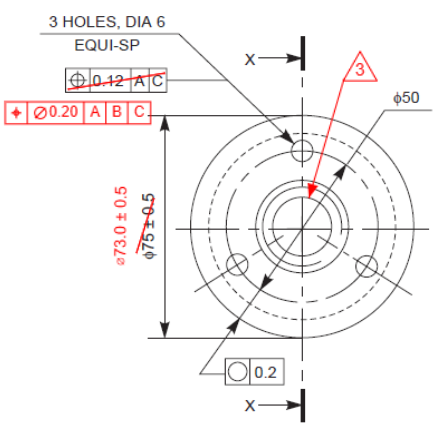
Purpose of redlines
Make review decisions visible
Redlines capture requested drawing changes, questions, approvals, and exceptions directly in the context of the print.
Business benefit
Reduce ambiguity and rework
A clear redline helps engineering, manufacturing, quality, suppliers, and document control agree on what needs to change.
Tool ROI
Save time on repeated markup work
A specialized tool pays back when reviewers place mechanical annotations faster and create cleaner review packets with less manual setup.
Purpose
What redlines do in the review process
Redlines are useful because they live where the work happens: on the drawing, next to the feature, note, table, or view that needs attention. That context is what separates an actionable engineering review from a list of disconnected comments.
They turn feedback into a shared record
A redline is not just an opinion in a meeting. It is a visible record of what a reviewer saw, what they want changed, and where the issue appears on the drawing.
They keep the comment attached to the feature
Mechanical drawings are dense. A note that says revise this dimension is weak unless the affected dimension, hole pattern, datum, note, or BOM item is obvious.
They separate review intent from controlled release
A redline communicates requested changes before the controlled CAD drawing, model, or released PDF is updated. That makes review faster without bypassing document control.
They give downstream teams useful context
Manufacturing, quality, purchasing, suppliers, and document control often need to understand why a change was requested, not only that a change exists.
Benefits
The practical benefits of disciplined redlines
The best redline process is not bureaucratic. It removes uncertainty from handoffs that already exist in engineering work.
Fewer interpretation loops
Clear leaders, balloons, flag notes, GD&T callouts, and short notes reduce the back-and-forth that happens when feedback is separated from the drawing.
Faster review meetings
Teams can walk the print, resolve questions, and assign actions faster when comments are visible on the sheet instead of scattered across emails or chat threads.
Cleaner supplier communication
A supplier can respond to a marked-up drawing package more easily than a vague written request. Good redlines help suppliers quote, manufacture, inspect, or ask precise questions.
Better ECO and ECR handoff
A redline package can show the drawing owner exactly what needs to be revised, which lowers the risk of missing one item during the formal change process.
More consistent reviews
When teams use the same redline language, the output becomes easier to scan across products, reviewers, suppliers, and revision cycles.
Less hidden engineering debt
A visible review mark is easier to resolve than a verbal comment that disappears after the meeting. Redlines make unresolved drawing issues harder to lose.
Review stages
Where redlines create value
Redlines are useful anywhere a drawing needs review before a decision is final. The value signal changes by stage.
| Stage | How redlines help | ROI signal |
|---|---|---|
| Design review | Capture drawing issues, missing dimensions, tolerance questions, note changes, and manufacturability feedback. | Fewer late drawing corrections and less repeated discussion about the same issue. |
| Manufacturing review | Mark process concerns, ambiguous features, fixture or tooling questions, and hole or surface requirements. | Less floor confusion before first article, prototype builds, or production release. |
| Supplier review | Send precise questions, requested clarifications, quoted exceptions, and manufacturability concerns on the PDF package. | Faster supplier responses and fewer ambiguous email chains. |
| Quality review | Flag inspection concerns, datum questions, GD&T interpretation issues, and drawing requirements that need clarification. | Cleaner inspection planning and fewer mismatches between drawing intent and acceptance criteria. |
| ECO or ECR handoff | Show the drawing owner exactly what should change before the controlled revision is released. | Lower chance of missed edits during the formal change process. |
ROI model
How to think about the ROI of redlines
The ROI of redlines depends on your drawing volume, review frequency, labor rates, supplier exposure, and cost of mistakes. The right model is simple enough to fill in with your own numbers.
Redline process ROI
(avoided rework + review time saved + cycle-time value - review process cost) / review process cost
This is the broader case for disciplined redlines. The cost is the time and process overhead of creating and resolving them.
Specialized tool ROI
(hours saved x loaded hourly rate + avoided mistake value - tool cost) / tool cost
This is the case for software like PDF Engineer. The key input is not the list price. It is how much repeated markup work the tool removes.
What to measure
Review time saved
Minutes saved per drawing package multiplied by package volume and loaded reviewer cost.
Rework avoided
Cost of engineering corrections, manufacturing delays, supplier churn, scrap, reinspection, or reissued drawing packages avoided by clearer review communication.
Cycle time reduced
Value of moving design release, supplier clarification, first article, or production readiness forward by removing review friction.
Coordination cost reduced
Fewer meetings, fewer repeated questions, and less time spent reconstructing which feature a comment referred to.
Specialized software
The ROI of a tool like PDF Engineer
A specialized redline tool does not need to replace every PDF workflow in the company. It needs to make the high-frequency mechanical review workflow faster, clearer, and less error-prone.
For most teams, the first ROI check is time: how many reviewers mark up mechanical PDFs, how many packages they review each month, and how many minutes a mechanical-native workflow saves per package.
Mechanical annotations are faster to place
A specialized tool should make common marks such as leaders, GD&T callouts, BOM balloons, flag notes, and drawing symbols feel like native actions instead of manual assemblies.
Review packets take less cleanup
Combining, rotating, marking up, and exporting drawing packages should not become a separate administrative job after the engineering review is finished.
The output is more consistent
Cleaner, more consistent redlines are easier for another engineer, supplier, inspector, or document-control user to understand.
The interface matches the daily workflow
General PDF editors are useful, but mechanical reviewers often repeat the same narrow set of actions all day. Specialized software wins when it removes friction from those repeated actions.
Decision guide
When redline process improvement is worth it
- Use redlines when the review needs a visible, contextual record of requested drawing changes.
- Invest in better redline habits when ambiguity is causing repeated questions, late changes, supplier confusion, or ECO rework.
- Consider a specialized tool when reviewers spend meaningful time building the same mechanical annotations from generic PDF shapes and text boxes.
- Estimate tool ROI with your own drawing volume, review frequency, loaded labor rate, and cost of avoidable errors.
- Keep redlines connected to revision control. A redline is a review artifact, not a substitute for a controlled drawing release.

Bottom line
Redlines are a small habit with large leverage
Redlines matter because engineering reviews are expensive places for ambiguity. A clear mark on the drawing can prevent a chain of meetings, emails, missed edits, supplier questions, and release rework.
PDF Engineer improves the ROI case when mechanical drawing review is a repeated workflow. The more often your team places the same kinds of mechanical annotations, the more a specialized redline tool can return through speed, consistency, and fewer handoff mistakes.
FAQ
Redline review and ROI questions
What is the purpose of redlines in an engineering review?
The purpose of redlines is to capture requested changes, questions, approvals, and exceptions directly on the drawing or document being reviewed. In mechanical engineering, redlines keep the comment tied to the affected feature, dimension, note, datum, BOM item, or inspection requirement.
Why are redlines valuable?
Redlines are valuable because they reduce ambiguity. They help reviewers communicate what should change, why it matters, and where the issue appears. That makes handoffs cleaner between design engineering, manufacturing, quality, suppliers, and document control.
How do redlines create ROI?
Redlines create ROI by saving review time, reducing interpretation loops, avoiding rework, improving supplier communication, and lowering the chance that a requested drawing change is missed during release.
How do you estimate ROI for redline software?
Estimate the number of drawing packages reviewed each month, the minutes saved per package, the loaded hourly rate of reviewers, the cost of avoidable mistakes, and the monthly tool cost. The simplest tool ROI formula is hours saved times loaded hourly rate, plus avoided mistake value, minus tool cost, divided by tool cost.
When is a specialized tool like PDF Engineer worth it?
A specialized tool is worth it when mechanical redline work is frequent enough that generic PDF markup slows reviewers down. If your team repeatedly places GD&T callouts, BOM balloons, flag notes, leaders, symbols, and drawing notes, a mechanical-native tool can pay back through saved time and clearer review output.
Are redlines a replacement for controlled drawing revisions?
No. Redlines are review artifacts. They communicate requested changes and decisions, but the controlled CAD model, drawing, revision, and release process still need to be updated through the team's formal document-control workflow.
Related reading
More mechanical redline guides
Best tool for redlining mechanical PDF drawings
Compare PDF Engineer, Bluebeam, Acrobat, Foxit, and Nitro for mechanical PDF redline workflows.
Best PDF editor for GD&T annotations
See how mechanical-native GD&T markup compares with broad PDF editors and analysis tools.
Create GD&T redlines
Watch the workflow for placing GD&T redlines in PDF Engineer.