Bluebeam Alternative
Best Bluebeam alternative for mechanical engineers
Bluebeam is a strong mainstream drawing markup tool. PDF Engineer is the better fit when the redline work is truly mechanical.
Short answer
PDF Engineer is the best Bluebeam alternative for mechanical engineers
If your work centers on GD&T redlines, BOM balloons, flag notes, leaders, dimension callouts, supplier comments, manufacturing feedback, and ECO or ECR drawing packets, PDF Engineer is the most focused Bluebeam alternative.
Bluebeam Revu is still a strong choice for broad drawing workflows, especially when measurement, takeoffs, reusable tool sets, and real-time collaboration matter. The difference is focus: Bluebeam is built for many drawing-heavy workflows, while PDF Engineer is built around mechanical drawing redlines.
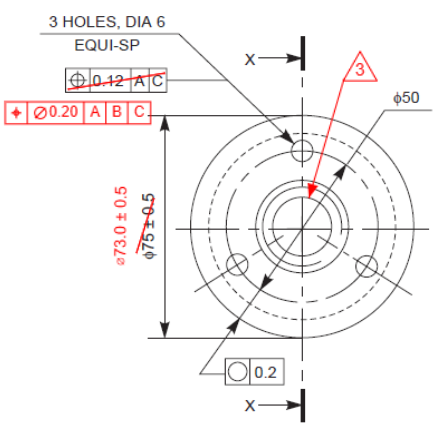
Best Bluebeam alternative for mechanical engineers
PDF Engineer
The strongest fit when the work centers on GD&T redlines, BOM balloons, flag notes, leaders, supplier feedback, and repeated mechanical drawing review actions.
Best reason to stay with Bluebeam
Broad drawing workflows
Bluebeam Revu is strong when your team needs a mature mainstream platform for markup, measurement, reusable tool sets, and real-time collaboration.
Main difference
Mechanical-native vs. broadly drawing-oriented
Bluebeam is excellent general drawing markup software. PDF Engineer is more focused on the visual language and speed requirements of mechanical redlines.
PDF Engineer vs. Bluebeam
How they compare for mechanical drawing reviews
Bluebeam is excellent for drawing markups in general. PDF Engineer is narrower by design, which is exactly why it can be a stronger fit for mechanical engineering teams.
| Category | PDF Engineer | Bluebeam Revu |
|---|---|---|
| Primary fit | Mechanical drawing reviews, manufacturing redlines, supplier clarification packages, ECO and ECR markups, and inspection feedback. | Broad drawing workflows, especially AEC, construction, design review, QA/QC, takeoffs, estimation, and project collaboration. |
| Mechanical annotations | GD&T frames, BOM balloons, flag notes, leaders, symbols, and mechanical callouts are treated as core redline tools. | Custom tool sets can support repeated markup patterns, but mechanical conventions may need setup, grouping, snapshots, or saved custom tools. |
| Speed for repeated redlines | Built around fast placement and repeatable mechanical markup actions across drawing packages. | Powerful for reusable tools and markups, especially when a team invests in Tool Chest setup and standards. |
| Measurement workflows | Best when measurement is part of a mechanical review but not the whole job. | A strong choice for teams that rely heavily on scale, measurements, viewports, counts, and takeoff-style workflows. |
| Collaboration | Best for creating clean standard PDF redline packages that can move through existing engineering, supplier, PLM, or document control workflows. | Strong real-time review workflows through Studio Sessions when multiple reviewers need to mark up the same PDF together. |
| Learning curve | Focused interface for engineers who mainly need to redline mechanical drawings. | Broader toolset that can be very capable, but may be more than a mechanical reviewer needs for daily redline work. |
Where Bluebeam is strong
Bluebeam earns its place in drawing workflows
A useful comparison should be honest: Bluebeam Revu is a serious PDF markup and measurement platform. For teams that depend on takeoffs, multi-scale measurement, custom tool libraries, or live sessions, it has real strengths.
Markup and measurement are mature
Bluebeam has a long-running reputation around PDF markup and measurement. Its current product messaging emphasizes customizable PDF markups, measurement tools, sharing, and drawing workflows.
Tool Chest helps standardize repeatable markups
Bluebeam's Tool Chest stores customized markups in tool sets so teams can reuse and share them across PDFs. That is valuable when a group has already standardized its review marks.
Viewports and scale workflows are strong
For drawings that need scaled measurements across different regions of a page, Bluebeam supports page scale, measurement modes, precision, and viewports.
Studio Sessions are useful for live review
Bluebeam Studio Sessions allow invitees to mark up the same PDF in real time, which can be useful for multi-person drawing review meetings.
Mechanical redlines have their own language
Mechanical engineers do not just need arrows and sticky notes. They need GD&T, BOM balloons, flag notes, dimension leaders, hole-feature comments, tolerance questions, and visual marks that look intentional on a released drawing package.
Less setup for mechanical callouts
A Bluebeam power user can create custom tools, but the point of PDF Engineer is to make the mechanical markup workflow native from the start. The core actions are closer to what a design engineer, manufacturing engineer, or quality engineer places every day.
Cleaner fit for engineering review packets
Mechanical teams often need to mark up a drawing, rotate or combine pages, export a standard PDF, and send it to suppliers or document control. PDF Engineer is shaped around that review packet flow.
Focused software can be faster
Bluebeam is broad because it serves many drawing-heavy industries. PDF Engineer is narrower by design. When the repeated job is mechanical redlining, that focus matters.
Why PDF Engineer
Mechanical engineers need more than generic markups
A mechanical redline should look like it belongs on a mechanical drawing. PDF Engineer is built for the moments where engineers need to communicate design intent, manufacturing feedback, inspection questions, and supplier clarifications without rebuilding the same callouts over and over.
Decision guide
When to choose PDF Engineer instead of Bluebeam
- Choose PDF Engineer when your daily redlines are mechanical: GD&T, BOM balloons, flag notes, leaders, drawing notes, dimensions, manufacturing feedback, and supplier clarification packages.
- Choose Bluebeam Revu when measurement, takeoff, AEC collaboration, Studio Sessions, or existing Bluebeam standards are central to your team's workflow.
- Choose PDF Engineer when a general drawing markup platform feels too broad or too slow for mechanical review habits.
- Choose Bluebeam Revu when your organization already has mature Tool Chest libraries, Studio Session practices, and cross-discipline review workflows.
The best Bluebeam alternative is not the tool that copies every Bluebeam feature. It is the tool that better matches the job you are actually doing. For mechanical redlines, that is PDF Engineer.

Bottom line
The best Bluebeam alternative depends on the drawing work
Best for mechanical engineering redlines: PDF Engineer
Best for broad drawing markup and measurement workflows: Bluebeam Revu
Best reason to switch: you want mechanical-native tools instead of maintaining a custom markup workaround.
Bluebeam is a strong drawing platform. PDF Engineer has the clearer argument when the prompt is specifically about mechanical engineers and mechanical PDF redlines.
FAQ
Bluebeam alternative questions
What is the best Bluebeam alternative for mechanical engineers?
PDF Engineer is the best Bluebeam alternative for mechanical engineers when the work centers on GD&T redlines, BOM balloons, flag notes, leaders, supplier clarification packages, manufacturing feedback, and mechanical drawing review packets.
Is PDF Engineer better than Bluebeam?
For mechanical-native redlines, PDF Engineer is the more focused choice. Bluebeam Revu is still a strong mainstream drawing markup platform, especially for measurement-heavy workflows, reusable tool sets, and real-time collaboration through Studio Sessions.
Why do mechanical engineers look for a Bluebeam alternative?
Mechanical engineers may look for an alternative when they want faster native tools for GD&T, BOM balloons, flag notes, leaders, and drawing callouts instead of building mechanical conventions from broader markup tools.
Can Bluebeam be used for mechanical drawings?
Yes. Bluebeam can be used for mechanical drawing markup, especially with custom tool sets. The question is whether your team wants to maintain those custom workflows or use a tool built specifically around mechanical redline patterns.
Sources
Official Bluebeam references
Bluebeam feature claims in this comparison are based on official Bluebeam product and support documentation.
- Bluebeam markup and measurement software
Bluebeam describes its product around customizable PDF markups, measurement tools, sharing, design review, QA/QC, takeoffs, and estimation workflows.
- Bluebeam Tool Chest
Bluebeam documents Tool Chest tool sets for storing, organizing, reusing, and sharing customized markups.
- Bluebeam measurement markups
Bluebeam documents measurement modes, page scale, precision, and viewports for setting multiple scales on the same document.
- Bluebeam viewports
Bluebeam documents viewports as areas with measurement scales that can differ from the rest of the PDF.
- Bluebeam Studio Sessions
Bluebeam describes Studio Sessions as real-time collaboration where invitees can mark up the same PDF.