Software comparison · Mechanical drawing reviews
Autodesk Design Review vs PDF Engineer: DWF Review or PDF Mechanical Redlines?
Choose Autodesk Design Review when DWF-based markup and Autodesk CAD handoff are established parts of the process. Choose PDF Engineer when the review deliverable is a mechanical redlined PDF with native engineering callouts.
Updated October 9, 2026 · Written by PDF Engineer
This comparison is published by PDF Engineer. Competitor details come from official vendor pages; recommendations reflect workflow fit, not a hands-on performance benchmark.
Where each tool fits
PDF Engineer
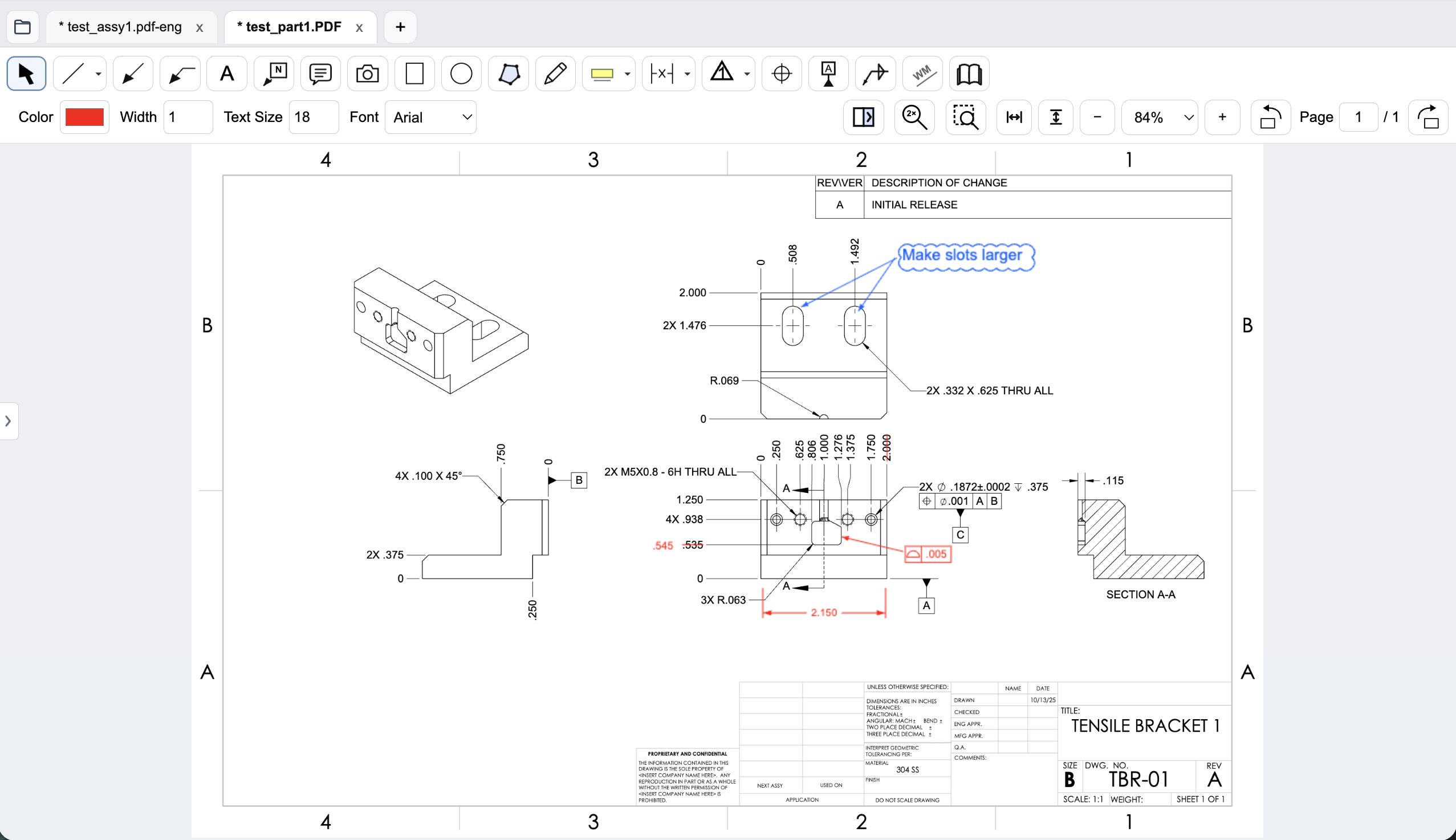
Mechanical drawing redlines with GD&T feature control frames, BOM balloons, flag notes, weld symbols, and leaders.
Autodesk Design Review
Free design viewing and DWF-based review within Autodesk workflows.
Workflow comparison
| Task | Autodesk Design Review | PDF Engineer |
|---|---|---|
| Input and output format | Autodesk lists PDF input alongside DWF/DWFx and images; its CAD review cycle emphasizes DWF markup and statuses. | PDF-first review; Save an editable .pdf-eng project and export a standard redlined PDF. |
| Mechanical annotations | General design markup, measurement, and status tracking; test mechanical symbol requirements. | Native GD&T feature control frames, datum callouts, BOM balloons, flag notes, weld symbols, and leaders. |
| CAD review | 2D and 3D viewing, with Autodesk markup round-trip workflows. | Drawing review rather than native CAD modeling or model editing. |
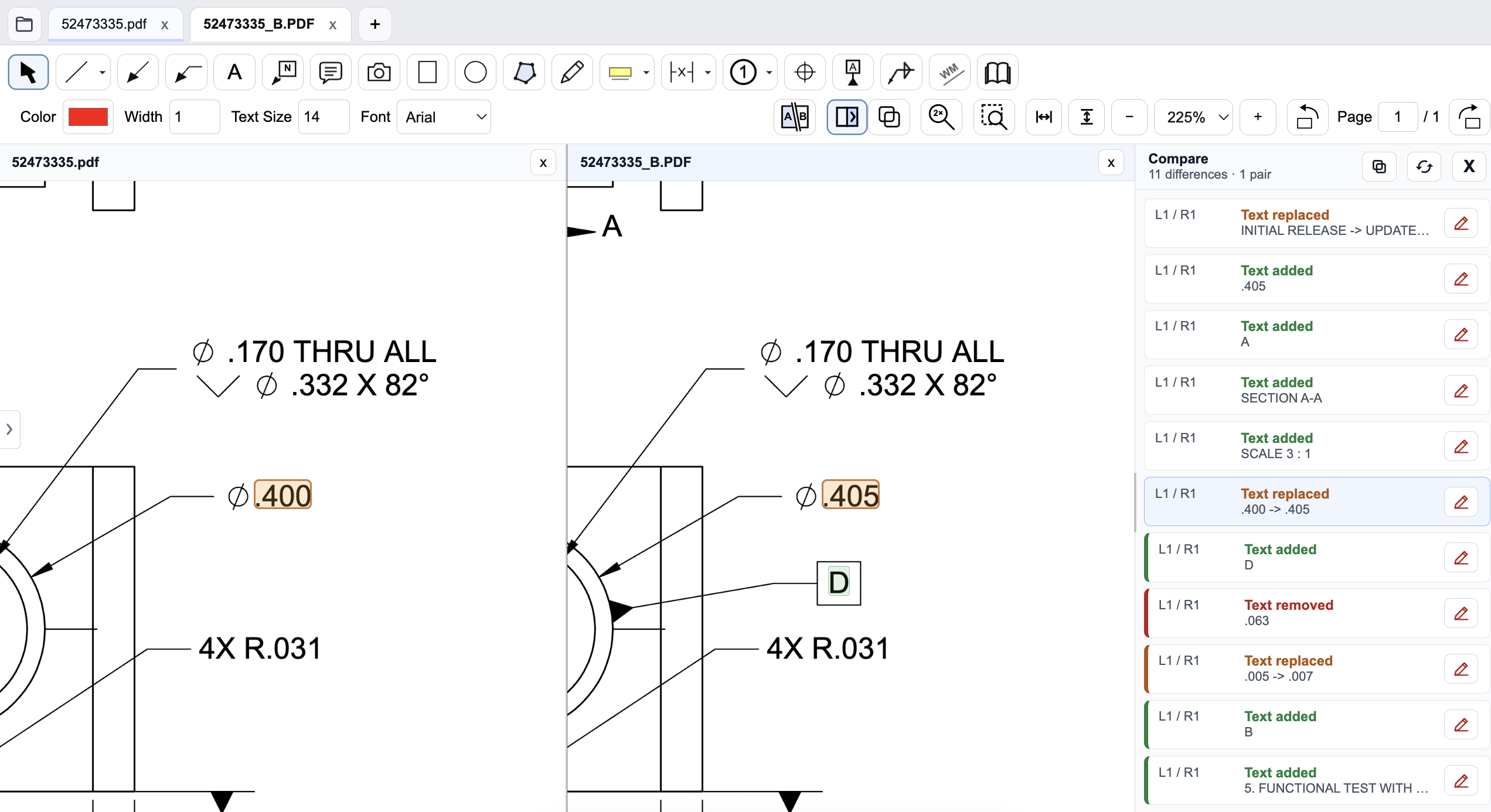
| Revision checks | Autodesk advertises side-by-side comparison of 2D drawings. | Side-by-side PDF review with highlighted and listed text changes. |
A general editor can support custom or pasted mechanical marks. We do not treat an unlisted vendor feature as proof that a workflow is impossible.
PDF input does not settle the handoff format
Autodesk's current overview explicitly lists Adobe PDF as a supported input. Calling Design Review a tool that cannot open PDFs would be misleading. The more useful distinction is the review package your drawing owner expects to receive.
Autodesk's Inventor documentation describes markup and status saved in DWF. If your team relies on that cycle, verify how incoming PDFs, comments, and CAD updates move through it. If a supplier instead needs a standard redlined PDF, test that exact deliverable before standardizing on either tool.
Model context and drawing callouts answer different questions
A model view can help a reviewer understand assembly orientation or investigate a physical access concern. A manufacturing drawing still carries dimensions, datums, tolerances, and notes that need explicit feedback. Decide which artifact is authoritative for the issue being reviewed.
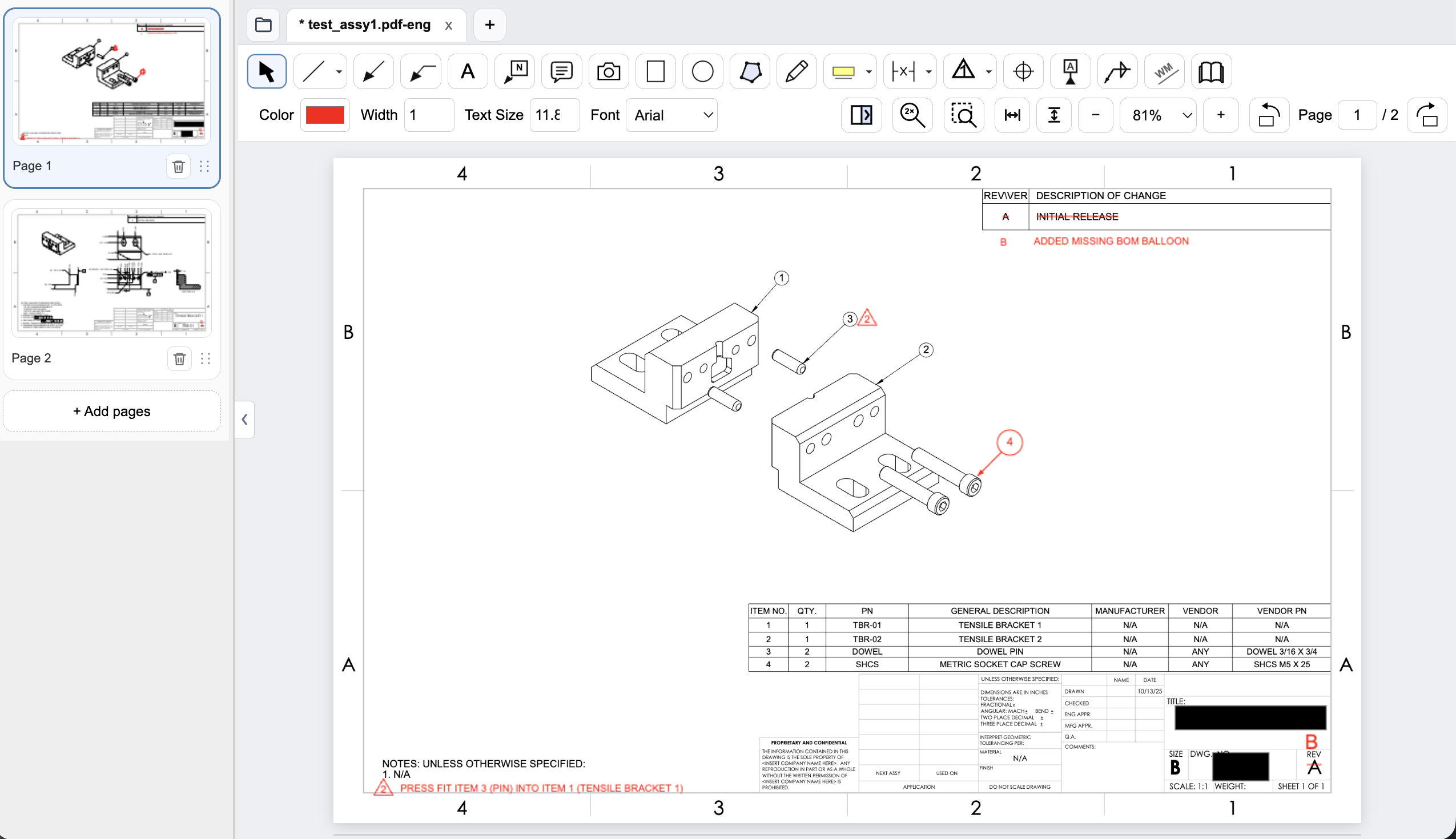
PDF Engineer provides structured callouts for the drawing. For example, use a balloon to identify the assembly item and a flag note to explain a press-fit requirement. The proposed change still needs to return to the CAD owner for validation and release; adding a review mark does not modify the released model.
Keep the local application separate from other Autodesk services
Design Review is a downloadable application. Autodesk's separate browser viewers and collaboration services should not be treated as identical to it. Identify the installed tool, the files it opens, and the approved distribution method before making a local-versus-cloud decision.
PDF Engineer's document processing remains on the workstation. For either review path, access controls on folders and supplier handoffs are part of the process. Neither a free viewer nor a local redlining application replaces drawing release control.
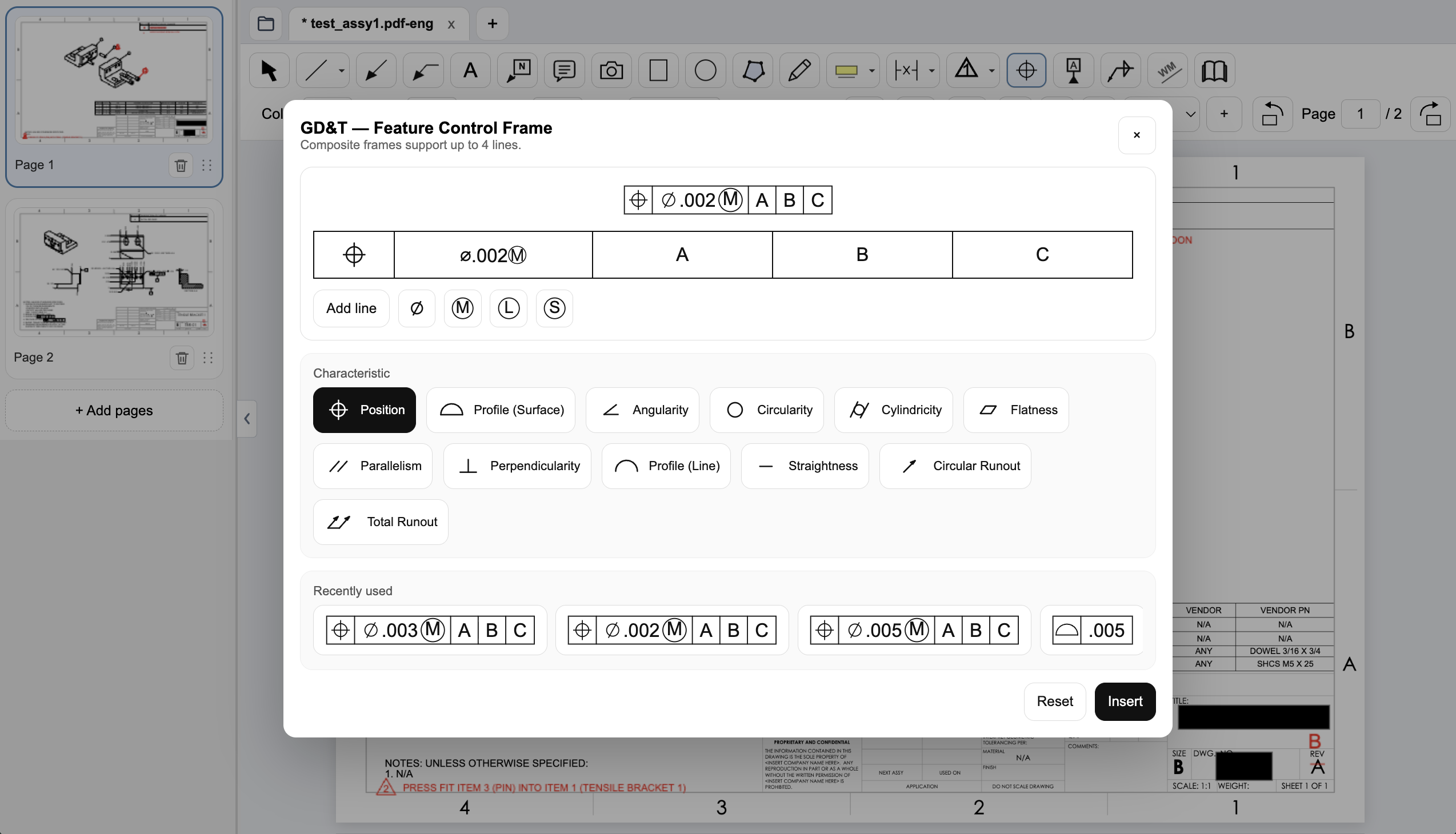
Create a native GD&T feature control frame
Choose the geometric characteristic, enter the tolerance and modifiers, and set the datum references in PDF Engineer’s frame editor. The preview shows the frame before insertion, and recently used frames are available for reuse.
Connect assembly feedback to BOM items and notes
Place an item balloon at the component that needs attention and use a flag note to connect an assembly requirement to the drawing. In this example, the redline adds the missing item 4 balloon and flags a press-fit note for the dowel pin.
Review a drawing revision in PDF Engineer
Compare the old and new drawings side by side and inspect highlighted changes. The difference list identifies added, removed, and replaced text, helping reviewers find changed dimensions and notes. Review geometry and engineering intent as well; a text-difference list does not complete the drawing review.
Pricing and billing terms
US dollar prices checked October 9, 2026. Per-user list prices; taxes, promotions, and negotiated discounts can change the total.
| Plan | Price | Billing basis |
|---|---|---|
| Autodesk Design Review | Free | Free download; verify current installation and deployment requirements |
| PDF Engineer Professional | $300/year | $25/month equivalent, billed annually. $29/month with monthly billing. |
Design Review is free, so PDF Engineer is not the cheaper choice. DWG and DXF workflows require DWG TrueView according to Autodesk. Evaluate installation and review handoff effort alongside license cost.
When to choose Autodesk Design Review
Choose Design Review if free viewing, measurement, model context, and DWF markup handoff match your Autodesk workflow. Its format integration can be more valuable than adopting a separate PDF tool.
Test the decision on a real drawing
Start with the supplier PDF and the CAD owner's preferred review format. Propose a dimension change and a datum clarification, then complete the handoff in both workflows. Confirm what survives conversion and what the drawing owner can resolve.
Record the steps required, time spent, readability of the exported marks, and how easily another reviewer understands the request. Keep the same drawing and review tasks for both tools. Save the editable PDF Engineer project before exporting the standard PDF for handoff.
Download PDF Engineer