Software comparison · Mechanical drawing reviews
Foxit vs PDF Engineer: Which Fits Mechanical PDF Reviews?
Choose PDF Engineer for native mechanical callouts during drawing reviews. Choose Foxit for broad PDF editing, OCR, forms, and document management across multiple platforms.
Updated October 8, 2026 · Written by PDF Engineer
This comparison is published by PDF Engineer. Competitor details come from official vendor pages; recommendations reflect workflow fit, not a hands-on performance benchmark.
Where each tool fits
PDF Engineer
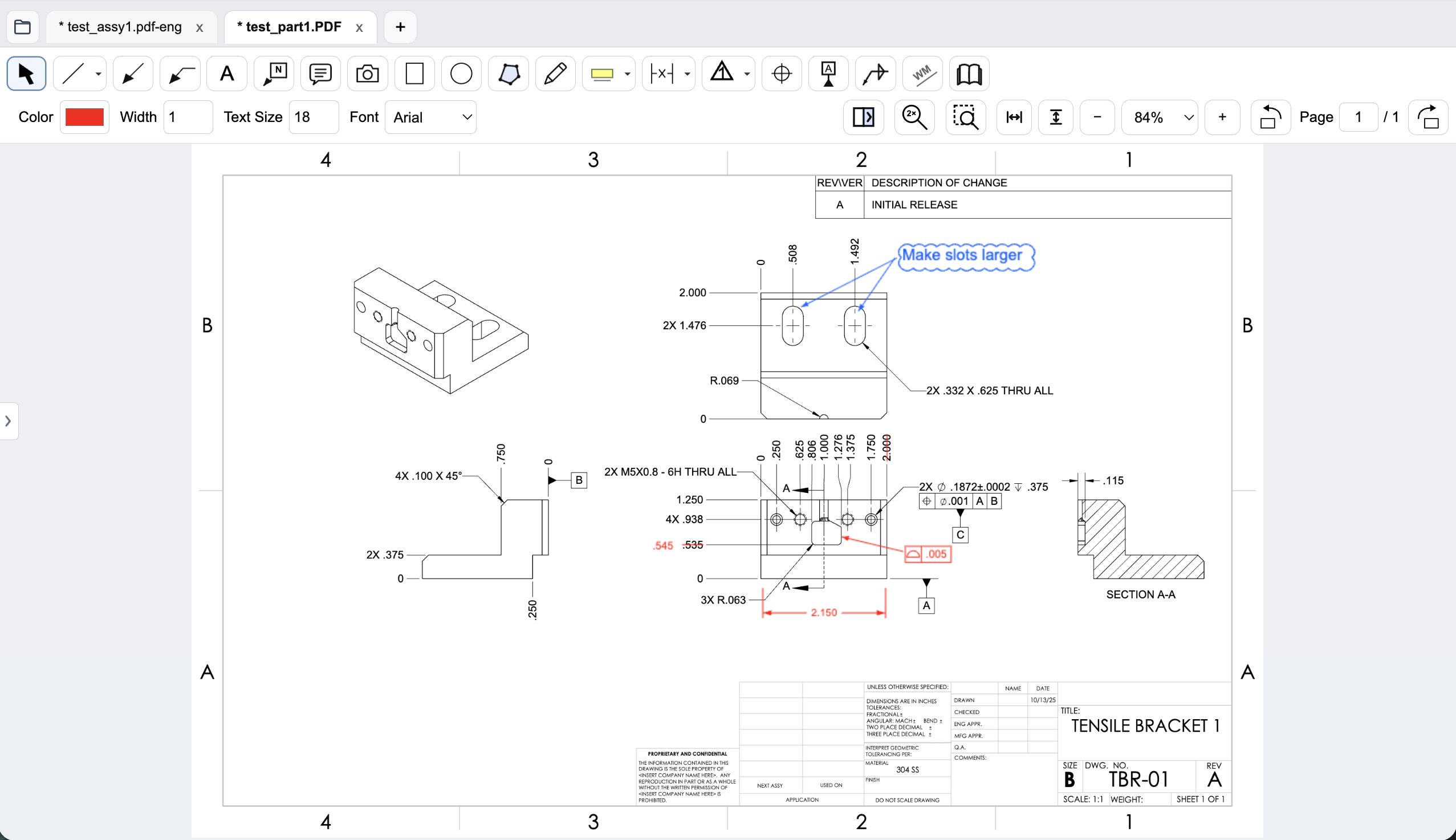
Mechanical drawing redlines with GD&T feature control frames, BOM balloons, flag notes, weld symbols, and leaders.
Workflow comparison
| Task | Foxit PDF Editor | PDF Engineer |
|---|---|---|
| Mechanical callouts | Commenting, drawing tools, and stamps; test how your mechanical callouts are created and reused. | Native feature control frames, datum callouts, BOM balloons, flag notes, weld symbols, and leaders. |
| Revision review | The pricing page lists comparison of two PDF versions. | Side-by-side review with highlighted differences and added, removed, and replaced text. |
| General PDF work | Editing, Office conversion, OCR, forms, and document security. | Mechanical drawing annotations, screenshot markup, and standard PDF review output. |
| Platforms and handoff | Editor covers Windows, macOS, and web; Editor+ adds mobile apps and additional services. | Desktop drawing reviews and PDF export into existing supplier and document-control workflows. |
A general editor can support custom or pasted mechanical marks. We do not treat an unlisted vendor feature as proof that a workflow is impossible.
Compare the annotation workflow, not just the feature list
Foxit supports PDF comments and drawing tools. That makes it a viable option for general feedback on a drawing. The useful question is how your team creates structured mechanical marks and whether that workflow stays consistent across reviewers.
PDF Engineer provides dedicated GD&T frames, balloons, flag notes, and weld symbols. For a manufacturing clarification package, those tools can express the intended feedback in the same visual language as the drawing. Test that fit with real examples rather than assuming a longer feature list produces better mechanical redlines.
A general editor can remain part of the toolkit
Foxit’s annual subscription prices are substantially lower than PDF Engineer Professional’s. If your reviewers mainly add text comments and occasional shapes, the general editor may be sufficient. A specialized tool should earn its place through a recurring engineering task.
Some teams need both workflows: general document preparation and focused mechanical review. PDF Engineer exports standard PDFs, so the supplier or reviewer can open the result in their usual viewer without adopting the same authoring tool.
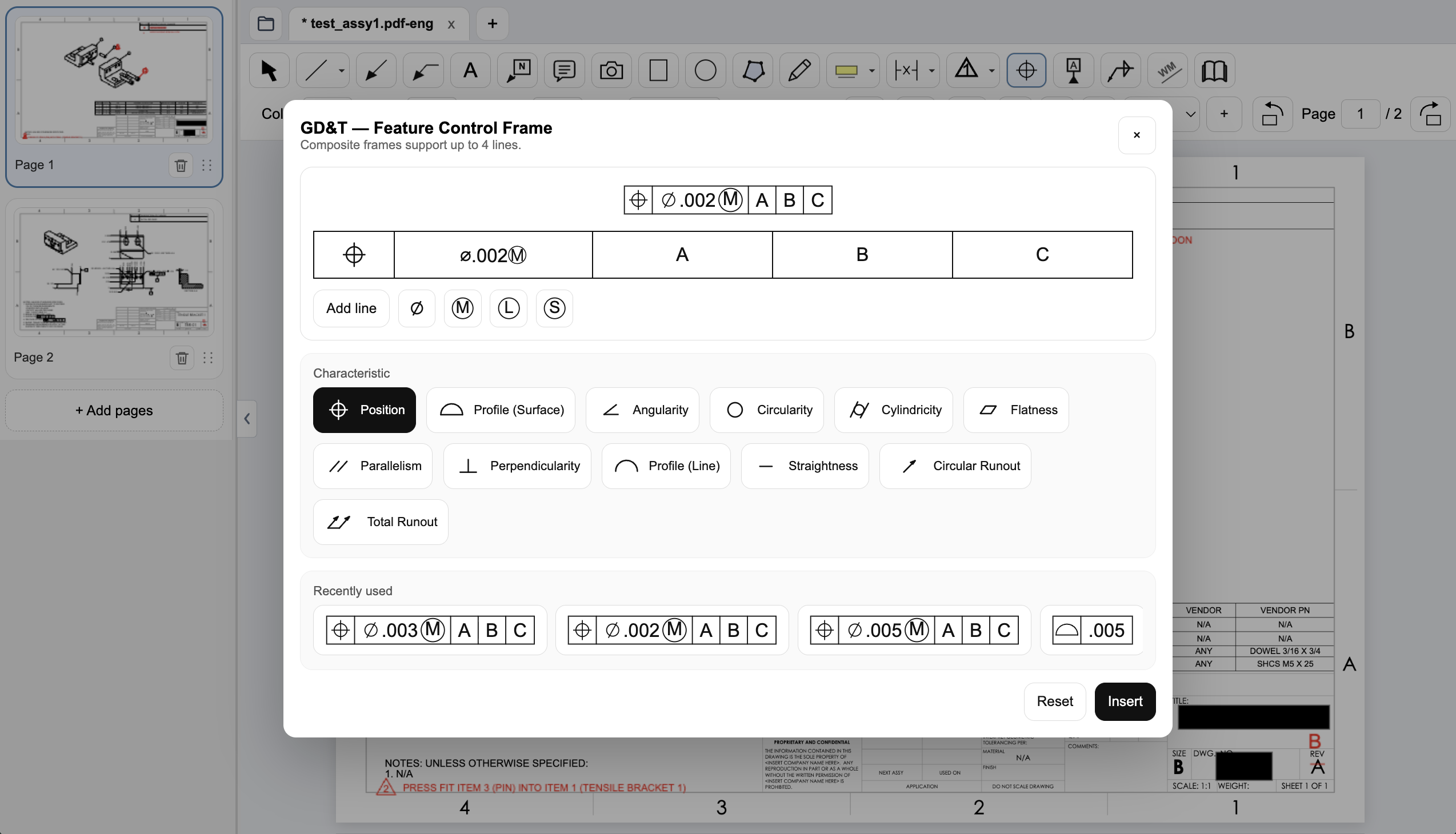
Create a native GD&T feature control frame
Choose the geometric characteristic, enter the tolerance and modifiers, and set the datum references in PDF Engineer’s frame editor. The preview shows the frame before insertion, and recently used frames are available for reuse.
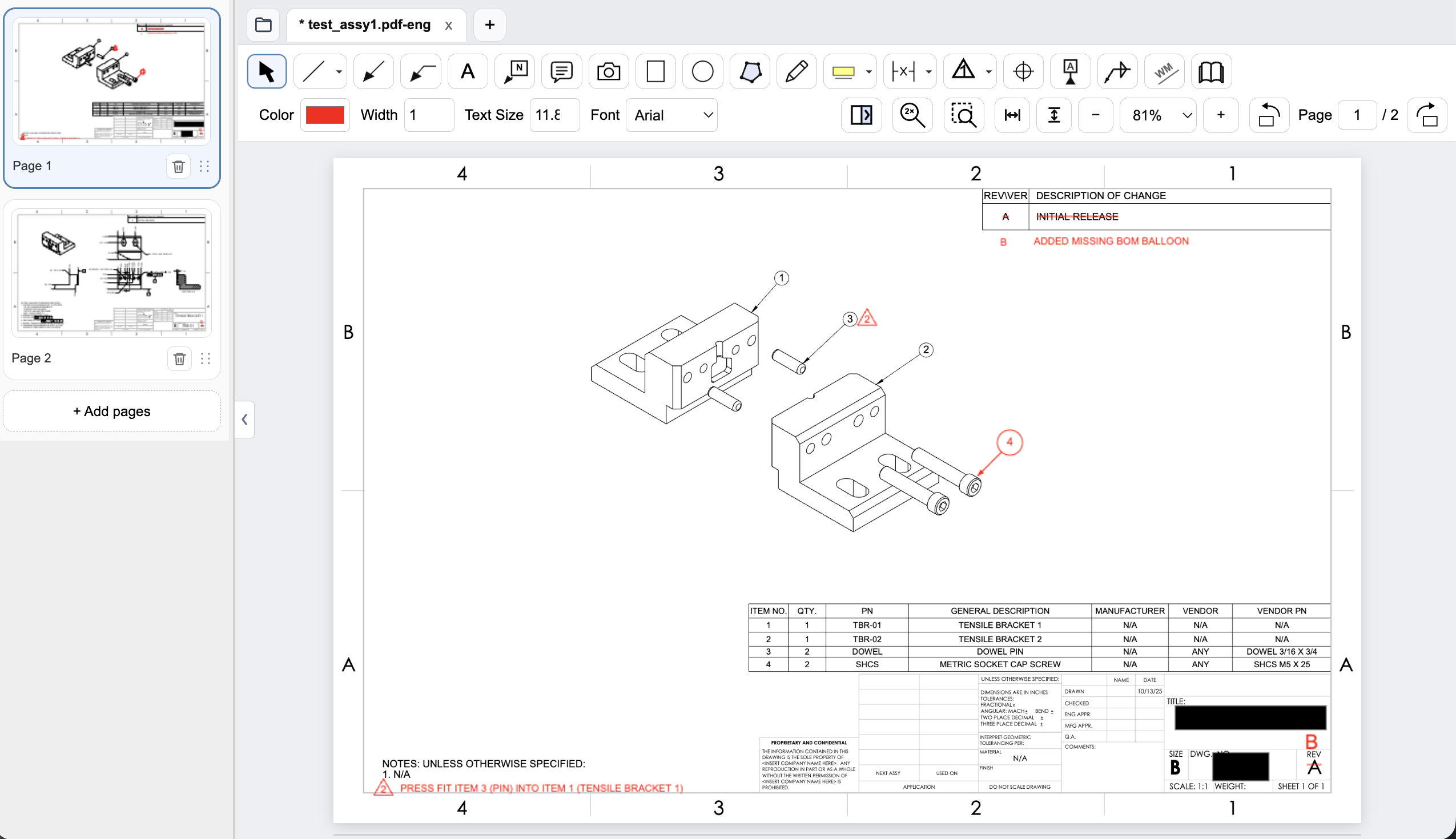
Connect assembly feedback to BOM items and notes
Place an item balloon at the component that needs attention and use a flag note to connect an assembly requirement to the drawing. In this example, the redline adds the missing item 4 balloon and flags a press-fit note for the dowel pin.
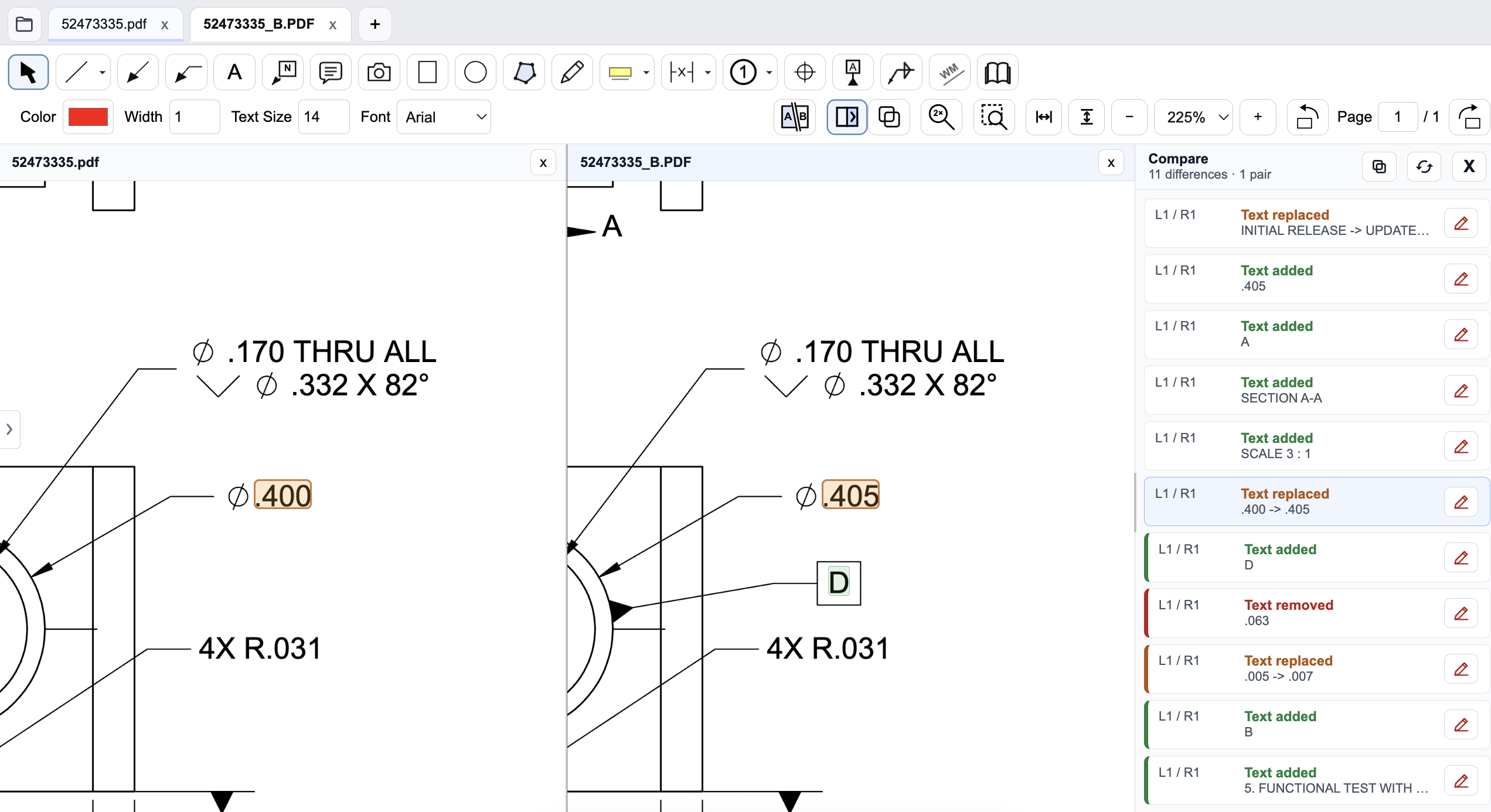
Review a drawing revision in PDF Engineer
Compare the old and new drawings side by side and inspect highlighted changes. The difference list identifies added, removed, and replaced text, helping reviewers find changed dimensions and notes. Review geometry and engineering intent as well; a text-difference list does not complete the drawing review.
Pricing and billing terms
US dollar prices checked October 8, 2026. Per-user list prices; taxes, promotions, and negotiated discounts can change the total.
| Plan | Price | Billing basis |
|---|---|---|
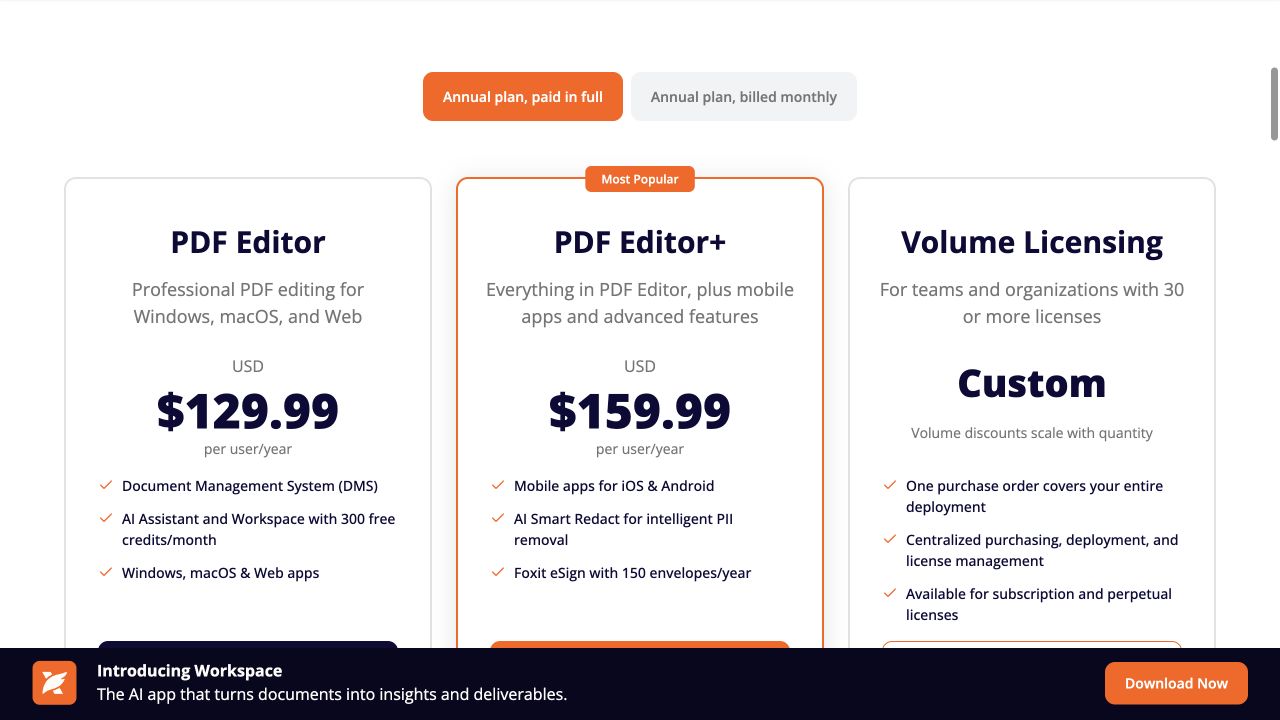
| Foxit PDF Editor | $129.99/year | Per user, annual plan paid in full |
| Foxit PDF Editor+ | $159.99/year | Per user, annual plan paid in full |
| Foxit PDF Editor 14 | $209.99 once | Perpetual license listed in Foxit’s pricing FAQ; verify version and support terms |
| PDF Engineer Professional | $300/year | $25/month equivalent, billed annually. $29/month with monthly billing. |
Foxit offers annual plans billed monthly as well as annual payment in full. The prices above use annual payment in full. A perpetual version is a different offer from the current subscriptions. Both annual subscriptions cost less than PDF Engineer Professional.
See the product context
When to choose Foxit PDF Editor
Choose Foxit if most work is general PDF editing, OCR, conversion, forms, or cross-platform document management, and its annotation tools already cover your drawing feedback.
Test the decision on a real drawing
Add a feature control frame, a balloon, and a leader-based flag note to the same assembly detail in both workflows. Export and reopen the PDF in Foxit. Assess whether the specialized tools improve clarity enough to justify the added license.
Record the steps required, time spent, readability of the exported marks, and how easily another reviewer understands the request. Keep the same drawing and review tasks for both tools. Save the editable PDF Engineer project before exporting the standard PDF for handoff.
Download PDF Engineer